Mediabriz records your recent activity and displays a real-time timestamp showing when you last opened each conversation. This helps you retrace your recent work and prioritize ongoing tasks.
Viewing last-viewed timestamps
Open the Recently Viewed panel from the Mediabriz toolbar.
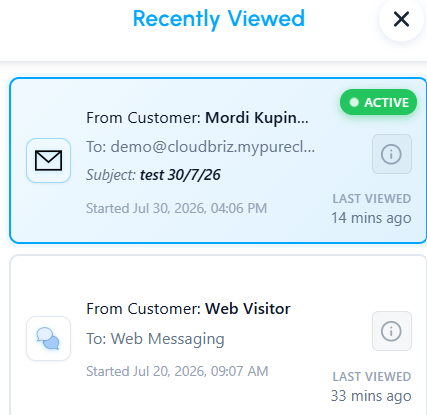
Each conversation card displays a LAST VIEWED indicator at the bottom right, such as 9 mins ago or 28 mins ago.
The conversation that is currently open or being handled displays an ACTIVE badge at the top.
Calls in the list show when the call started instead of LAST VIEWED, and whether it is In progress or Ended. They have no ACTIVE badge and can't be opened.
How timestamps update
- Real-time updates: Each time you open or return to Message History, Mediabriz refreshes the conversation’s LAST VIEWED timestamp.
- Preserving your position: Reopening a conversation from the Recently Viewed list returns you to where you left off, making it easier to move between customer conversations.
Was this article helpful?
That’s Great!
Thank you for your feedback
Sorry! We couldn't be helpful
Thank you for your feedback
Feedback sent
We appreciate your effort and will try to fix the article