AI Reply suggests text in the Mediabriz reply box. Always review it, edit if needed, and select Send. Nothing is sent automatically.
Send AI Reply
In Live Conversations, select Preview latest messages to open the Latest messages card. You can also select Messages on the conversation to reply below its message history. AI Reply is the first tool under the reply box, before Translate.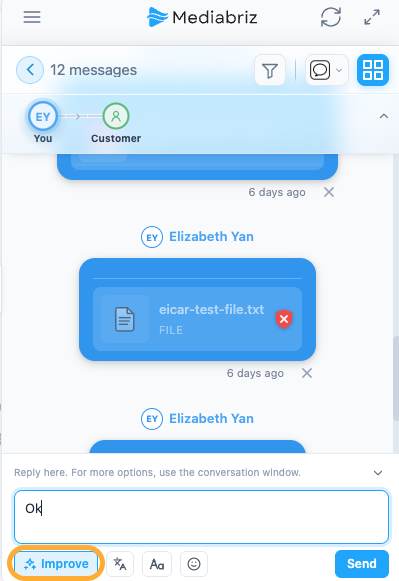
Draft or improve a reply
- With an empty box, select Draft to suggest a reply from the conversation.
- Read the suggestion marked Review before sending. Use Undo to restore your previous text or Try again for another version. Review and edit, then select Send.
To improve your own reply, type your text and select Improve. Review the rewritten reply before selecting Send.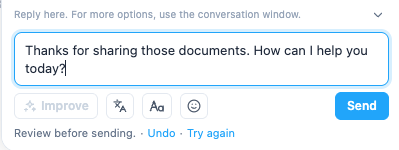
Replies use the customer's language when clear, otherwise the language your administrator chose. You can type your note in your own language.
AI Reply supports live web messaging, SMS, WhatsApp, Messenger, Instagram and Open Messaging conversations. It is not available for email. If the button is missing, ask your administrator.
For basic sending instructions, see How do I reply to a customer from Mediabriz?
Was this article helpful?
That’s Great!
Thank you for your feedback
Sorry! We couldn't be helpful
Thank you for your feedback
Feedback sent
We appreciate your effort and will try to fix the article