The Priority Strip, displayed at the bottom of the Mediabriz main view, continuously identifies the next conversation that should be answered.
Based on the current conversation prioritization, it identifies the next conversation that requires your attention.
The Priority Strip displays:
- Customer name and communication channel.
- Wait time, showing how long the customer's earliest unanswered message has been waiting for a reply.
- Latest message time, showing when the customer last sent a message.
- Remaining conversations, showing how many additional conversations are currently waiting for a reply.
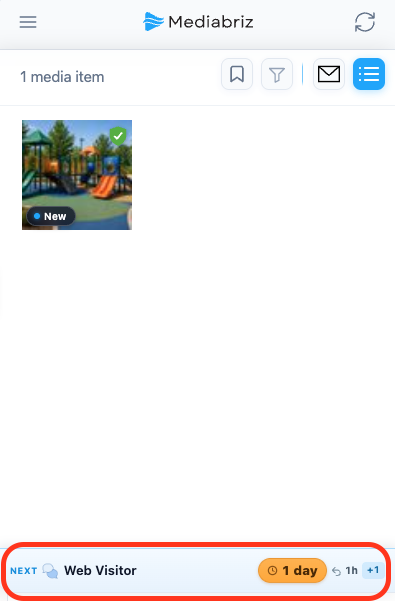
Priority Strip Statuses
Next
Displayed when another conversation should be answered before the conversation you are currently viewing in Genesys Cloud. The Priority Strip identifies the next conversation that requires your attention.

On it
Displayed when you are already viewing in Genesys Cloud the conversation that should be answered next.

All Caught Up
Displayed when there are no conversations waiting for a reply.

Need more details?
Select the Priority Strip to open the Live Conversations view, where you can view your prioritized conversations, preview unread messages, and quickly open the conversation you want to handle.
Learn more about Live Conversations.
Was this article helpful?
That’s Great!
Thank you for your feedback
Sorry! We couldn't be helpful
Thank you for your feedback
Feedback sent
We appreciate your effort and will try to fix the article