In the Live Conversations view, each conversation card displays two distinct time indicators to help you accurately prioritize response times based on how long the customer has actually been waiting for an answer.
Understanding the Difference: "Awaiting Reply" vs. "Last Message"
To prevent customers from losing their place in line when sending follow-up messages, Mediabriz tracks wait times using two separate metrics:
Awaiting reply [Duration]: Highlights the total, uninterrupted duration the customer has been waiting for an agent's response since their first unreplied query.
LAST MESSAGE [Time ago]: Shows strictly when the most recent message was received in the chat.
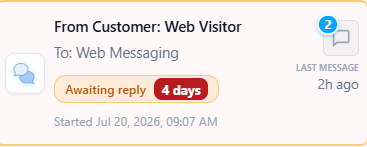
Why follow-up messages do not reset the wait timer
If a customer sent an initial question 4 days ago and didn't receive a response, sending a follow-up ping today (e.g., "Any updates?") will update the LAST MESSAGE indicator to 2h ago.
However, because the original query remains unresolved, the Awaiting reply timer continues counting from the initial query (4 days). This ensures that follow-up pings do not mask long-standing unreplied tickets or drop the customer's true queue priority.
Was this article helpful?
That’s Great!
Thank you for your feedback
Sorry! We couldn't be helpful
Thank you for your feedback
Feedback sent
We appreciate your effort and will try to fix the article