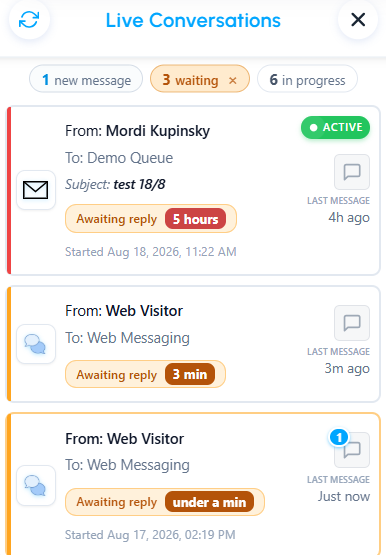
In Live Conversations, colored accents help you quickly see which customers have been waiting for a reply and
may need your attention.
What do the colors mean?
The color changes as the customer's waiting time increases:
Messaging conversations
- Orange – waiting for 5 minutes or more
- Red – waiting for 15 minutes or more
Email conversations
- Orange – waiting for 30 minutes or more
- Red – waiting for 60 minutes or more
The waiting time starts from the customer's first unanswered message. If the customer sends another message while waiting, the timer continues from the first message rather than starting again.
Once you reply, the conversation is no longer marked as waiting for a response.
This makes it easy to spot conversations that have been waiting longer and decide what needs your attention first.
Was this article helpful?
That’s Great!
Thank you for your feedback
Sorry! We couldn't be helpful
Thank you for your feedback
Feedback sent
We appreciate your effort and will try to fix the article