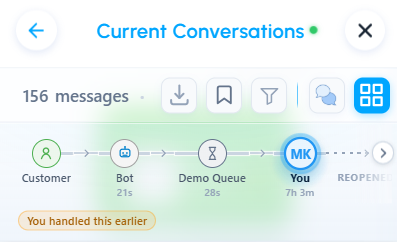
The Customer Journey appears at the top of Message History. It provides immediate context about the stages the customer passed through before reaching you, including bot interactions, queue wait times, routing steps, and the people who handled the conversation.
Understanding the journey milestones
The Customer Journey presents the conversation flow from left to right:
Customer → Bot → Queue → Agent
The available milestones depend on how the conversation was routed.
- Queue names: See the queue through which the conversation was routed.
- Dwell times: See how long the conversation remained at each stage, such as the bot or queue.
- Current position: Identify the stage currently displayed in Message History.
Navigating Message History with the Customer Journey
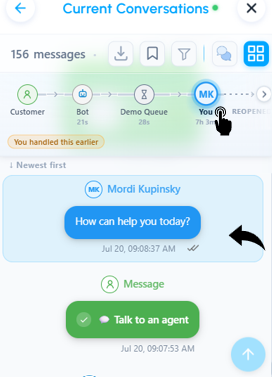
The Customer Journey and Message History remain synchronized to help you navigate long conversations.
- Jump to a stage: Select a milestone, such as Bot or Queue, to move directly to the first message associated with that stage.
- Track your position: As you scroll through Message History, the Customer Journey updates to highlight the stage associated with the messages currently displayed.
Related article
Was this article helpful?
That’s Great!
Thank you for your feedback
Sorry! We couldn't be helpful
Thank you for your feedback
Feedback sent
We appreciate your effort and will try to fix the article