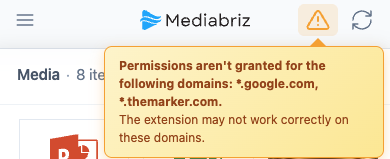
Mediabriz shows a domain warning when the browser has not given it access to a domain it is set to run on.
- In the extension settings, a yellow notice lists the domains without access.
- In the Mediabriz app, a warning icon appears in the header. Its tooltip lists the same domains.
This usually happens when:
- A custom domain was added and access has not been allowed yet. This includes domains your organization adds by policy.
- Access to the domain was removed in the browser (on the extension's Details page, under Site access).
To resolve it, open the extension settings, click Grant access in the yellow notice, then select Allow. Do this once per browser profile.
If the notice asks you to click Save Custom Domains instead, the domain was not saved because access was denied. Re-enter the domain, click Save Custom Domains and select Allow.
If the warning names the Genesys Cloud region, see What should I do if I see "Permissions were not granted for this Genesys Cloud region"?.
Once access is allowed, the notice clears. Refresh the page if the warning icon remains.
If the domain still has no access, your organization may block extensions on that site. Contact your IT administrator and refer them to Custom Domain Issues.
Was this article helpful?
That’s Great!
Thank you for your feedback
Sorry! We couldn't be helpful
Thank you for your feedback
Feedback sent
We appreciate your effort and will try to fix the article