When a new message arrives in one of your assigned conversations that you are not currently viewing in Genesys Cloud, Mediabriz displays a pop-up notification so you can quickly identify and respond to the update.
How Notifications Work
What the notification shows
The notification helps you quickly identify:
- Which conversation received the new message.
- Who sent the message.
- Whether multiple conversations have unread messages.
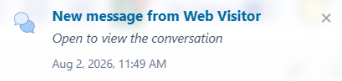
Quick Navigation: Selecting the notification opens the Live Conversations view, where you can preview unread messages and quickly open the conversation that requires your attention.
Managing Multiple Notifications
If new messages arrive in multiple conversations, you can:
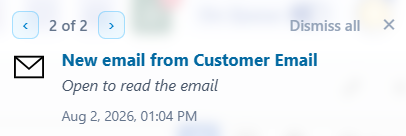
Use the Arrow controls at the top of the banner to cycle through unread notifications (e.g., 1 of 2, 2 of 2).
Click Dismiss all or the X icon to clear the notification stack.
Was this article helpful?
That’s Great!
Thank you for your feedback
Sorry! We couldn't be helpful
Thank you for your feedback
Feedback sent
We appreciate your effort and will try to fix the article